An AI meeting summary can list a tidy owner and deadline that the meeting never agreed. Before you create tasks from it, check each item against the transcript: what kind of item is it, who accepted it, what deadline was actually said, and where in the transcript it was said. Use the timestamps to find the words. A timestamp is an evidence entry, not a deadline.
Microsoft’s help for Teams recaps says AI-generated content is based on the event transcript and that some AI-generated content might be inaccurate, incomplete, or inappropriate. Its AI summary shows AI-generated notes and follow-up tasks. That is why the check below starts from the transcript, not from the summary.
Read the practice transcript first
This is a short synthetic transcript. The people and the event are fictional. The times are offsets into the recording, in minutes and seconds. They are not times of day, and they are not deadlines.
00:05 Riley: For this pilot, I propose we collect feedback in the existing support inbox.
00:18 Morgan: Agreed. Let's use the support inbox for pilot feedback.
00:25 Jules: Agreed on the support inbox too.
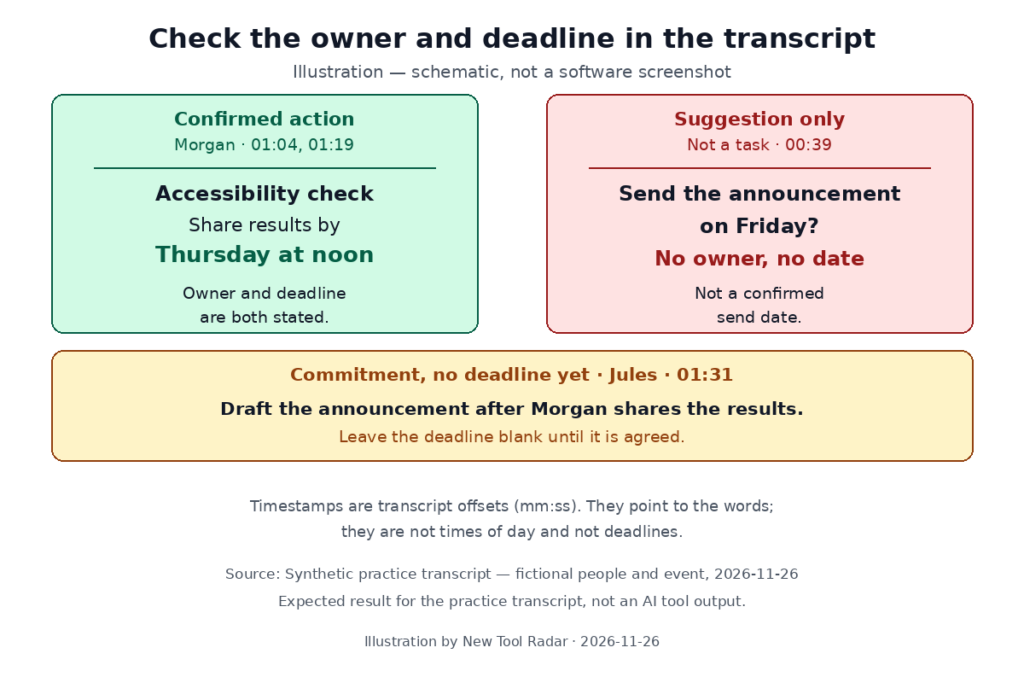
00:39 Morgan: Could we send the announcement on Friday? That's a suggestion, not a commitment.
00:52 Riley: Let's leave the send date open. We need the accessibility results first.
01:04 Morgan: I will run the accessibility check and share the results by Thursday at noon.
01:19 Riley: Confirmed: Morgan owns the accessibility check and will share results by Thursday at noon.
01:31 Jules: I'll draft the announcement after Morgan shares the results. We haven't agreed on a deadline for the draft.
01:44 Riley: I might collect sample screenshots if I have time. Please don't list that as an assigned task yet.
01:58 Jules: So the announcement send date is still open, and the inbox decision is final.
Separate tasks from decisions and open questions
Do not put every line into one task list. Sort each item first, then decide what to do with it.
- Decision: the group agreed on something. It is context, not a task, unless it needs follow-up work.
- Confirmed action: someone accepted the work, with a named owner and a stated deadline.
- Commitment without a deadline: someone accepted the work, but no deadline was agreed. Keep the deadline blank.
- Suggestion only: an idea was raised, not agreed. Do not turn it into a task.
- Not assigned: someone mentioned possible work and said not to list it as assigned yet. Do not list it as a task.
- Open question: a choice is still unresolved. Record it in the notes, not as an approved task or deadline.
Check the six items one by one
Expected result. We checked each row against the ten lines above. We did not run any AI meeting tool on this transcript. The checked list below is what to expect if the summary is correct; run the same check yourself on the transcript above.
| Item | Type | Owner | Deadline | Evidence |
|---|---|---|---|---|
| Collect pilot feedback in the existing support inbox | Decision | No owner, no task | No deadline | 00:05, 00:18, 00:25 |
| Run the accessibility check and share the results | Confirmed action | Morgan | Thursday at noon | 01:04, 01:19 |
| Draft the announcement | Commitment, no deadline agreed | Jules | No deadline agreed; draft after Morgan shares the results | 01:31 |
| Send the announcement on Friday | Suggestion only | No owner | No date | 00:39 |
| Collect sample screenshots | Not assigned | No owner | None | 01:44 |
| Announcement send date | Open, not decided | No owner | No date | 00:52, 01:58 |
Three mistakes this exercise catches
First, Friday is not a confirmed send date. At 00:39 Morgan asks, “Could we send the announcement on Friday?” and says it is a suggestion, not a commitment. At 00:52 Riley leaves the send date open, and at 01:58 Jules confirms it is still open. A summary that lists “Send the announcement on Friday” as a confirmed task is wrong.
Second, the screenshots are not an assigned task. At 01:44 Riley says, “I might collect sample screenshots if I have time. Please don’t list that as an assigned task yet.” “I might” is not “I will.” Keep it out of the task list until Riley agrees to own it.
Third, the support inbox is a decision, not an ownerless action item. At 00:05 Riley proposes it, and at 00:18 and 00:25 Morgan and Jules agree. There is nothing for one person to do, so it needs no owner and no deadline. Do not turn a settled decision into a task with no owner.
What to do with each type
- Decision: keep it as context in the notes. Create a task only if the decision needs follow-up work, and then write that work as its own item.
- Confirmed action: create the task with the owner and the deadline exactly as stated. Morgan owns the accessibility check, and the results are due Thursday at noon.
- Commitment without a deadline: create the task with the owner, and leave the deadline as “No deadline agreed.” Jules will draft the announcement after Morgan shares the results. Ask Jules or the meeting lead before adding a date. Do not invent one.
- Suggestion only: keep it out of the task list. Note it as a suggestion if you keep it at all.
- Not assigned: keep it out of the task list. If it becomes work later, confirm the owner first.
- Open question: record what remains undecided; ask the meeting lead to confirm it.
If a detail is unclear, leave it unclear
If the transcript does not name an owner, leave the owner blank and ask the meeting lead. If it does not give a deadline, leave the deadline blank. Do not guess, and do not convert a relative phrase into a calendar date without the meeting date. In this transcript, “Thursday at noon” is the deadline exactly as stated. No meeting date is given, so no calendar date is added here. For a real meeting, confirm the date and time zone before setting a calendar deadline. If the transcript seems unclear or mislabels a speaker, check the recording if you have access, or ask the participants.
If two items look alike, compare their outcome, owner, and deadline before combining them. Drafting the announcement and sending the announcement are different items. Jules committed to drafting. Nobody accepted the work of sending it, and no send date was agreed.
Limits
- No AI meeting tool was run on this transcript, and no real meeting was recorded for this guide. The checked list above is the expected result for the synthetic transcript, not a test of any product.
- This guide does not test transcription accuracy, and it does not cover Teams licensing, recording settings, or sharing recaps. Check the current product documentation for availability.
- See how we use practice files and verify claims for the distinction between a worked example and a product test.
- If the meeting is real, use only a tool your organisation allows for that recording, and do not upload a real recording to an unapproved tool to test a workflow. Practise on a synthetic transcript first.
Sources
- Recap in Microsoft Teams — Microsoft Support — Microsoft describes how to find notes and follow-up tasks in the recap, and explains why generated text needs checking.
- How to Review AI-Drafted Meeting Action Items Before Creating Tasks — ONES.com — a wrong owner, missed deadline, or invented commitment can create confusion after the meeting. Separate a clear commitment from a suggestion, an open question, or an AI inference. Do not guess when the discussion does not establish a commitment; items that remain uncertain stay off the task list. This is a vendor’s public guide, not Microsoft help.